Watta is a free iPhone rowing app for Concept2 ergs. Photograph the PM5 after the piece and it reads the numbers, scores the session 0–100 and puts it in front of your crew — no Bluetooth, no typing.
See how it works·On Android? Join the beta
On a laptop? Scan with your iPhone camera.
Free on iPhone. Open the App Store link
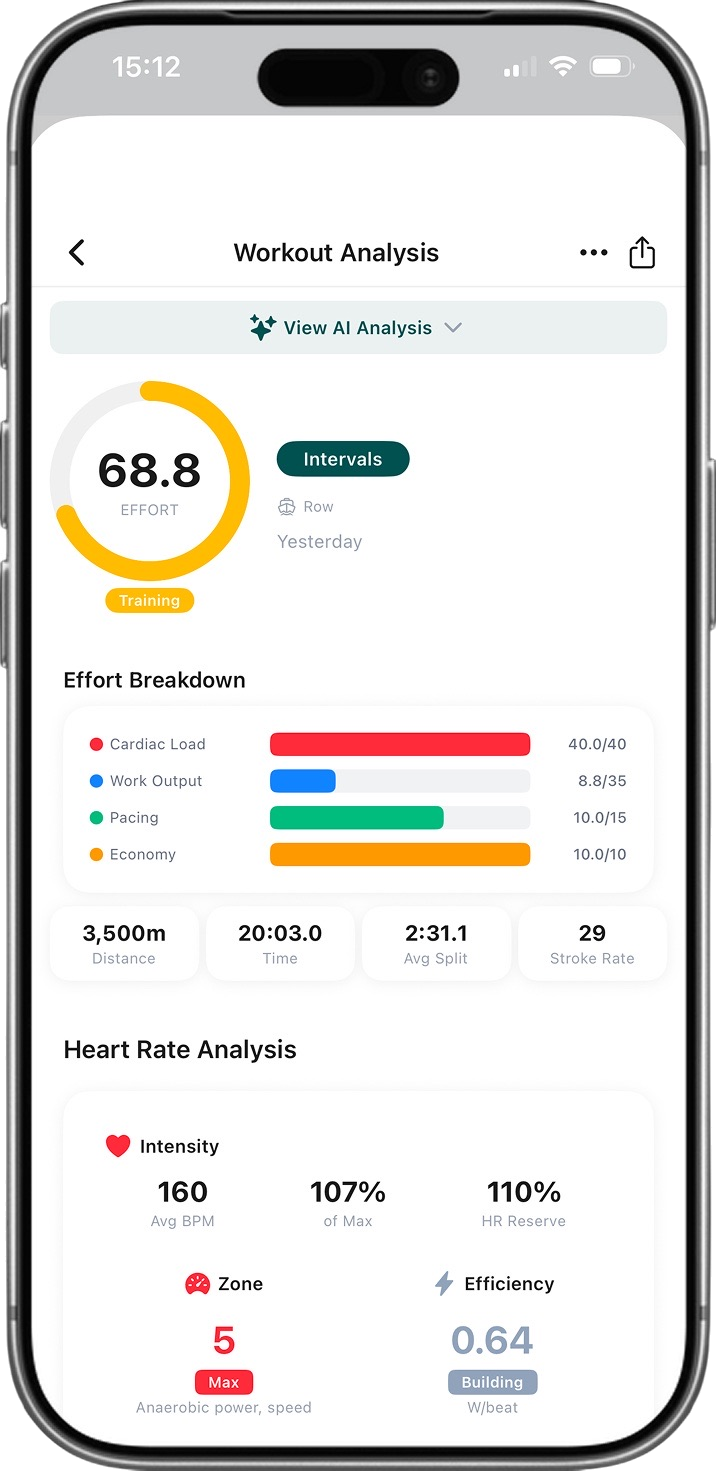
Photo. Check. Saved.
The whole log takes less time than wiping down the handle.
Photograph the screen
Take a photo of the PM5 after your piece — or pick an old one from your camera roll. Forgot to pair anything? Doesn't matter.
Check the numbers
Watta reads time, split, distance, stroke rate and intervals, plus heart rate, watts, calories and drag factor when the monitor shows them. Anything it is unsure about is flagged for you to confirm before saving.
Get your Effort Score
Every piece is scored 0–100 from cardiac load, work output, pacing and economy, saved to your history and personal bests, and shared with your club if you want.
Not every 2K
is equal.
The clock doesn't tell the whole story. Every workout gets a 0–100 Effort Score built from four parts of how hard you actually worked — not just what the split says.
Cardiac Load is worth up to 40 of the 100 points — pair a strap to the PM5 and your real heart rate drives it.
Try the Effort Score calculator — the same scoring rules, in your browser.
Your heart tells
the real story.
Watta uses your resting and max heart rate to build personalised zones with the Karvonen method — not generic percentages. Every piece with heart rate shows where it sat.
No heart rate monitor? You still get a score from power and pacing. Heart rate comes from the monitor photo when a strap is paired to the PM5.
Intensity
Average bpm, percentage of max and percentage of heart-rate reserve for every piece with heart rate — the numbers that define how hard you went.
Personalised zones
Five zones from resting and max heart rate by the Karvonen (heart-rate reserve) method: 50/60/70/80/90% of reserve. Interval screens with per-interval heart rate give an estimated zone breakdown.
Aerobic efficiency
Watts per heartbeat — one number for how efficiently you turn cardiovascular effort into power, tracked across sessions.
Built for rowers,
by rowers.
Every feature designed around the way you actually train.
Reads your erg screen
Photograph any Concept2 PM5 (or PM3/PM4) screen and Watta reads time, distance, split, stroke rate and intervals — and heart rate, watts, calories and drag factor when they are shown. Summary screens, interval screens and time pieces. Old photos from your camera roll work too.
Heart rate zones
See which Karvonen zone each piece sat in, and an estimated time-in-zone breakdown when an interval screen includes per-interval heart rate.
Social feed
Follow teammates, react to workouts, leave comments. See what your crew is putting down on the erg.
Clubs & squads
Create or join clubs with invite codes. Organise into squads for internal competition and squad leaderboards.
Strava & Concept2 Logbook
Push every logged piece to Strava automatically, and import the workouts you upload to the Concept2 Logbook through a read-only connection.
Train together.
Compete together.
Create or join rowing clubs, organise into squads, and see how you stack up on the leaderboard.
Leaderboards
Global, club and squad leaderboards ranked by Effort Score, distance or time.
Invite codes
Share a code and your squad is in. Simple onboarding for any team size.
Push notifications
Get notified when teammates post workouts or when your club has news.
What rowers
are saying.
From beginners to competitive athletes, here is how Watta fits into real training.
“Our whole squad logs 2K tests through Watta now. Seeing everyone's Effort Scores side by side is way more useful than just comparing splits.”
“I use the erg for HYROX prep and needed something that just tracks rowing without all the noise. Snap the screen, done.”
“I've been rowing for 15 years and finally have every session in one place. Looking back at three seasons of progress is incredibly motivating.”
“I can check in on my squad's training load without asking for screenshots. Clubs and leaderboards changed how I manage the team.”
“I didn't want to type in numbers after every workout. Photo, confirm, saved. That's it. Even I can't mess it up.”
“The Effort Score nails it. A hard steady-state at rate 18 finally gets the credit it deserves compared to a sloppy interval piece.”
“SkiErg and BikeErg support sealed the deal. I track all three machines in one app and compare effort across them.”
“I row twice a week and don't need anything complicated. Watta keeps it simple and the streaks keep me showing up.”
Dive deeper into
indoor rowing.
Guides, tools, and resources for rowers of every level.
Browse the
Watta library.
Jump straight to the most-read rowing guides, calculators, training programmes, and city pages.
Top Guides
View all →Top Calculators
View all →Top Workouts
View all →Rowing Glossary
View all →Rowing Near You
View all →Built for
Frequently asked
questions.
What is Watta?
Watta is a free iPhone app that turns photos of your erg screen into a training log. Photograph your Concept2 monitor after a piece and Watta reads the distance, time, split, stroke rate and intervals, scores the session 0-100 with the Effort Score, and shares it with your club or squad.
How does the Effort Score work?
A 0-100 rating of each session from four parts: Cardiac Load (up to 40 points, from average heart rate as a fraction of heart-rate reserve), Work Output (up to 35, watts and duration against a weight-scaled baseline), Pacing (up to 15, split consistency across intervals) and Economy (up to 10, watts per stroke). Scores map to Recovery (0-25), Building (26-50), Training (51-75) and Peak (76-100).
Which rowing machines does Watta support?
Watta reads Concept2 performance monitors: the PM5 on the RowErg (Model D and E), SkiErg and BikeErg, and the older PM3 and PM4 screens. Other brands are not supported by the screen reader, though you can log their sessions manually.
Is Watta free?
Yes. Watta is free on the App Store for iPhone (iOS 15.1 or later), with no subscription. Android is in closed beta on Google Play.
Do I need a heart rate monitor?
No. Without heart rate, Watta still scores the piece from power, duration, pacing and stroke rate, with the Cardiac Load part estimated conservatively from power. If you pair a strap to the PM5 so heart rate shows on the screen, Watta reads it from the photo and scores Cardiac Load from your real heart rate.
Does Watta sync with Strava?
Yes. Connect Strava once in settings and every workout you log in Watta is pushed to your Strava feed. Watta also imports the workouts you upload to the Concept2 Logbook through a read-only connection.
Every erg counts.
Photograph your erg screen after the piece and Watta logs it for you.
Download on the App StoreiPhone, iOS 15.1 or later · no subscription · Android beta